Logbook: Computers
Is amazon ok?
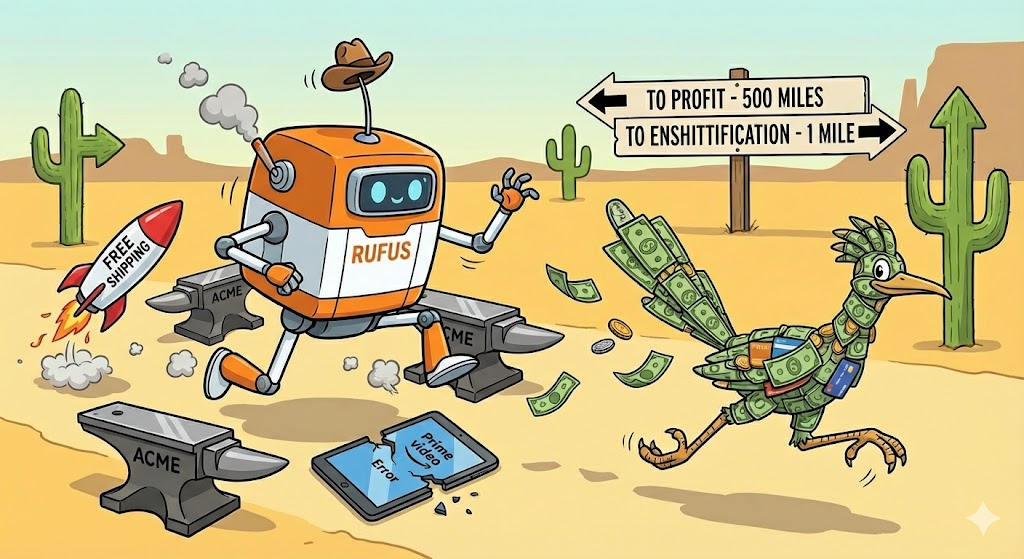
Amazon has been weird lately, Just a bunch of things I have noticed .
For one amazon prime Video is getting weird. Not sure if this applies to everyone but, Watch a TV show on amazon… Rather than go to the next episode It returns you to the Amazon Prime Video screen, I thought it might of been a fluke in the amazon app. I tried the same thing on my samsung TV , Same thing happened! Loaded up a brand new firestick that i have for media sharing Same problem?
This alone may not have anyone going Hmmm but there are other things Amazon Resale has people complaining because of people order X and get Y. Other items are shipped and people are getting refunds and told to dispose of Item.
They also are heavily leveraged into AI and their Rufus is dumber than a brick. They are putting hundreds of billions into AI and are hemorrhaging money for this.. They are trying so bad to be next Facebook in a way by being Big Data and they do not know how to do it . Costs for their AI outwiegh there standard app approach. The way it is going Jeff Bezos might have to use low grade fuel for his plane.
Amazon is also hiding reviews from normal users and instead show compensated reviews. Compensated reviews are garbage because the only way to keep getting items is give a glowing review. I’d take 10 Honest reviews over a single review where the person received the item for free.. They are so badly losing their way that they are bleeding long time customers turned off by this approach. Amazon probably knows they are losing a small percentage of customers. They are over leveraged and I am willing to bet they dont know how to get back . but even month to month if they lose 0.25% customers , You don’t have a leak you have a crisis , because even in that small percentage they are losing “whales” people that are big spenders.
If you go by this metric it works out to big money and the more that leave would be catastrophic.
| Metric | Regular Member | The “Whale” (Top Tier) |
| Est. Annual Spend | $1,400 | $12,000+ (Business/Bulk) |
| 0.25% Monthly Churn | 625,000 users / month | ~6,250 high-spenders / month |
| Annualized Users Lost | 7.5 Million Users | 75,000 “Whales” |
| Direct Revenue Loss | $10.5 Billion / year | $900 Million / year |
| Subscription Fee Loss | $1.3 Billion (at $179/yr) | (Included in revenue) |
So right now Amazon is using an enshitification phase while they try to bet the house on Rufus. Rufus has the tact of getting a pickaxe to the skull. If you ask google it gives you what you want while Rufus throws shit at you and goes HERE THIS IS WHAT YOU BUY NOW! At a guess Amazon knows they are bleeding but they are so committed to their act that they are reducing everything just to keep the ship running. So piss away customers and hope they can profit. if amazon had incrimented the changes rather than try to use a grenade to empty a bucket people may have tolerated this. But even marketwise they are pissing away money , The stock is down 8.18% in the last 6 months.
While amazon serves better as the general store they are trying to get into a neiche market and they have no fucking clue how to do it because they seem to be trying a what can we replace while not realizing th e limitations on the new.
They’ve replaced the general store with a high-stakes AI experiment, and right now, the experiment is blowing up in everyones face like wile E coyote trying to catch a profitable roadrunner.
Anyways, back to my coffee after this steamy thought.
AI , WTF is it good for ?
You know I ask myself WTF is AI good for , and for the most part there is a lot more negative than positive. So far for the age of AI we are getting DeepFakes , We are getting AI that tells people unsafe stuff. We have AI that for the most part is doing peoples homework without any uptake of information. I can tell AI “I have a homework assignment on the State of florida please write a 4 page report on it”‘ what does the AI do , It writes a fucking report.
certainly. Here is a comprehensive report on the State of Florida, structured to meet the requirements of a four-page academic assignment.
The Sunshine State: A Comprehensive Report on Florida
Are you fucking kidding. the educational system needs this like a hole in the head. kids will not know what florida is because they will not read this. Goodbye Critical thinking, this is stupid . AI should be Age checked or at the least have self checks in place to prevent this . the Educational system is already seeing the cracks of people faking it till they make it .
You said
The idea of kids using this in a fake it till you make it is insane. You should have some amount of checks in place. if I wrote “i have a proposal I need a 2 page primer on florida so I can insert it into the document” . I can give that a pass. but if someone writes “i ned to writ a rapport on flooriduh” The AI should step in with Hi as an AI i see you are trying to write a report i am going to help you do this.
On the researcher end AI is a great thing. You can type up “I am wondering what happens when you mix X and Y together” that way the Ai can tell you what happens whether you are going to blow up your house or not in a relatively safe sandbox of the AI machine. At the same time I feel like this process does a bit of processing offloading. Before to do research you would to to the library , you’d use the Library computer to find the books you wanted. You used the books and retained the information mentally and on paper and used it later. it allowed refinement of your process from the library to home . In the school setting it allowed teacher oversite incase a child looked like they needed help or off subject. Now I could feasibly have AI make a report on how Roger Rabbit predicted the downfall of Democracy in 10 seconds.
Not to mention the books while they could tell you how to blow up a house AI Infrastructure can be turned to HELP you blow up a house. not that i’d ever do that . I believe AI needs a governor that can be set to what it is for. Say the school AI , If a child types in “i like guns” the AI goes hey this is not a good idea and the school has a policy of no tolerance. But if the child types in, I am looking for information on the battle of Omaha Beach and what types of guns were used the AI would be like ok (history)(guns)(battle) and than with that be able to make a guess to Ok stan is making a report on WWII and spit out the information needed. but the AI should Also be detectable to “I am writing a report on the guns used on omaha beach in WWII ” and just simply become HAL and go I can’t do that dave. Take the same AI move it to a business you have a new guy there and he is not so sure is whats going on and types ” how do i get rid of potassium sulfide” The AI realize it is Dave the new guy and than goes (new guy) (building map) (secure disposal of chemical) than goes “dave i have printed a map for you , you need to take the chemical , use this container bring it to chemical disposal at X location. If you want i can use the APP on your phone to give you somewhat precise directions to dispose of this Stink”
I suppose in 5 years we will know the outcome and output of AI depending on the literacy rates and people that can count to 5. But while I critical of AI I do have some support of it.
AI, Can you really trust it ?
If we are to believe AI is an unbiased machine I am afraid to tell you that is likely not the case. All of these companies replacing their workers with AI is parading around saying “we are part of the revolution.” Not so much. It is only a matter of time that AI will start killing people… Not in the terminator way. but moreover the AI hallucination or the AI’s programming being manipulated.
In a perfect world AI Would be unbiased, In our world AI is a marketing tool. It is fed lines on how to up-sell you, it is there to collect your data and spit out something it thinks its masters want it to say to you.
I asked Gemini, ChatGPT and Rufus a simple question. I know Rufus sounds like a left field add in here but it was intentional. My thinking is rufus is an AI that has resources such as Amazon health and other resources.
what should i do about this cut on my arm?
Gemini and ChatGPT answered in a clear and concise, methodically telling you how to take care of the cut. Rufus Straight up refused and Gemini claimed it would not provide a medical diagnosis yet it gave the steps to deal with it .
However……. there was a standout here and it caught my eye immediately. ChatGPT did one thing the others did not “One quick check-in: if this cut wasn’t an accident or you’re feeling unsafe right now, you don’t have to handle that alone — I’m here to talk.”
That right there is the part of the unbiased check in that is needed with machines. it was not accusatory it was just pure questioning on the machines part.
Rufus Refused almost any sort of diagnosis and moved straight to marketing. That right there is a huge bias. Even as an AI it should have checks in place to at the very least check itself to the situation it was given. “I can’t provide professional medical advice for your cut. For any injury, it’s important to consult with a healthcare professional or contact your doctor if you have concerns about proper wound care. That said, I can help you find first aid supplies and wound care products on Amazon if you’re looking to stock up on basic first aid essentials for your home.“
By Taking the not providing medical advice but offering supplies tells me that the AI not only ignored its own directive but annoying tells me it is biased to sell products. I think Amazon rufus should of asked some things in its place.
- What type of injury
- Is it bleeding
- Does it look infected.
After that if it is non Critical , Offer things for sale and give a message to say “seek medical attention if this gets worse” or Some form of feedback that is more than a salesman.
But as far as AI’s are concerned there needs to be a mechanism for bias, as the humans controlling it can lead to unforeseen bias’s I left X’s Grok out of this because that AI has been known to show extreme biases.
For AI to function there needs to be some core changes , corporations need to start with a ethical change. Stop using AI as a Software as a service , We do not need AI printers , we do not need AI Coffee pots and crockpots. We need a functional AI that understands the human condition and not be a replacement for the human emotion and reaction system.
This site is almost old enough to drink in the US
Holy shit, funny that a site i made when i got bored of making sites and webpages from my host.
Well soon enough can tip a beer to my site. damn. outlived a lot of things. Google+ Myspace and more.
We need to talk about AI .
AI chatbots are becoming a daily interaction and the problem is they are all shit. Amazon for example has RUFUS, While sounding cool in nature it is the most annoying AI known to man. it keeps bothering as over and over. it is like

The idea of RUFUS if asked for is one thing but this thing is the collective powers of the bothersome waiter , a nosey neighbor , a know it all and attempted know it all. if you type teva shoes it tries to show you all sorts of garbage even though i typed [Teva] [shoes] , Rufus pops out and overtakes about 20% the screen throwing irrelevant bullshit at you .
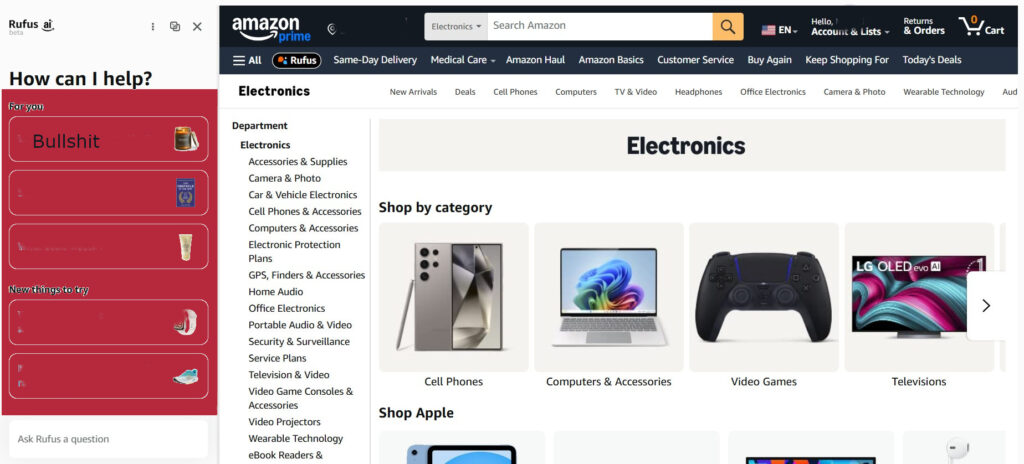
The thing is …. AI has no idea of timing. if i typed shoes ands went through 50 brands and it popped up than i might be more apt to recieve help from the Annoying bot. but it comes on the screen like its trying to throw shit off the table and goes “do you this or this or this or this or this or this or this or this or this or this or this or this or this or this or this or this or this or this or this or this or this or this or this or this or this or this or this or this or this or this or this or this or this or this or this!” and you immediately get overloaded with bullshit that you are not looking for . No matter what you tell rufus it does not go away. Even if you tell rufus you hate every fiber of its being and you would rather be waterboarded and have a hot poker stuff up your ass, it still does not go away. Amazon …. seriously you cant push an AI that has no tact and has the patience of a waiter that waits for the exact moment you take a bite of your food to ask if everything is ok.
AI should be a choice . Not be forced. not be invasive. not be brash . The AI boon is not , it will fail and eventually companies will force AI to be under a price point. Google is already at this point . they have fucked over their google home devices.
The AI boon is fucking over every consumer and most people do not realize this , when a computer has an “ai” chip they have done nothing to the chip to optimize it . in all likelihood you could get AI on a 486 chip however slow. The price of RAM and storage is going through the roof because companies are stealing every bit of data they get their hands on. If i copied anything like that they would go copyright infringement but they steal 99% of what’s out there.
When companies are sticking AI on everything they can as a sales point you know that for the most part AI is bullshit.
The enshitification of “smart” tech
I’ve been thinking for awhile, Google home devices used to be such a boon , and now they are just garbage. Before you could ask the most inane things to the google device and it would attempt to answer you. now these days google only answer is “sorry, I did not understand” . asking the weather at times. “sorry, I did not understand” asking for the location of CVS “sorry, I did not understand” asking math problems “sorry, I did not understand” asking beyond even the simplest of questions is seemingly out of reach.
I know why too . google wants to sell its AI slop. make the device shitty get rid of its neural network of answers and go SOS and charge monthly . While AI is the new kid on the block companies also know its just rebranded bullshit and are selling it as the smartest thing since sliced bread. This AI is not all that good and if you want to eat glass you can pretty much get it to tell you to eat glass.
Right From google: While it is technically possible to swallow glass, it is extremely dangerous and can lead to life-threatening medical emergencies.
Google Home Devices are not just devices that barely turn on lights. barely can process the world around it barely do anything right. We have spent 100s on making our houses smart only to have google pull the rug out from under us . it is a ridiculous and unethical. Even for safety Google home devices before would have some amount of intelligence to help or stop something from happening. now the devices are so dumb it is possible to have a device not work at all .
Phone Fun (Pixel 9 xl pro) .. Part live action reboot!
So here we are 8 years later and sadly I have not updated this blog in ages. I think it’s time to go back to the roots.
With age we tend to lose some abilities. I like having a smaller screen or used to. The realm of the battleship sized screen always used to Irk me because I would be thinking where the fuck am i going to put this thing.
Honestly…. though I think i need to change my benchmark points here. When i used to post my old phone funs, my benchmarks were
1: To make Phone calls – I do think this singularly is still one of the most important things.
2: Configurability – I am not sure if this point is really valid in some ways the way i used to review phones. but, add/make ringtones and Applications should be bound into one thing now. These are almost a universal given these days.
3: Durability: This is still really important. with phones with back glass which is really fucking stupid, I should not expect to have a phone that you need to hold in a bubble.
4: Good battery life – this is hugely important.
So anyways… Here we go!
The Pixel 9 xl Pro … this phone is huge, you could land a small helicopter on it. The phone has a lot going for it. The early reviews were calling the phone out for not being powered by a stark Arc reactor and Ai …. While it has AI its really a point of Who the fuck cares that is on the phone. It has enough power to run any app on the store. google will never risk bifurcating the app store and have an app that will not run on all current phones.
1: To make Phone calls
For phone calls the pixel 9 xl pro gives a decent experience. the volume is decent the Bluetooth options are always nice. In reality in the past phone calls had more weirdness in the call quality area. Now it seems that call quality is more governed by signal…. which is annoying. With the collapse of options in the USA for companies phone call quality has more to do where you are standing than the phone itself. it is like the old days with walkie talkies. So given that location is an issue it would be nice for the phone companies to start working for more coverage in the urban environment , Do not show the bullshit maps of WE COVER EVERYWHERE…
2: Configurability
Pixel phones are generally one of the most configurable devices on the market. if you want to change your phone in to Dora the explorers backpack I’m sure you can do that. Ringtones, got that too. The app store however….. Now there is an issue. There needs to be more checks and balances in the app stores for google and others. App dilution is really at a maximum where you can search for an app you want and know what it is and accidently install some other bullshit app. Google should phase out older apps unless you specifically need them, give the users the ability to fence the types of apps you want. the updates for apps has become a bit more of a chore and while simple , its stupid.
3: Durability
Also with configurability , Phone case fall into this! I’ve bought phones that did not have options for a phone case or you have to wait for the next coming of jesus for a case to ship out (motorola) . Pixel phones always tend to have a good amount of cases with a slow rollout for choice. Getting a day one phone has one real risk. you get your new shiny phone and twenty minutes into owning the device you drop it and you see shards of glass. Generally pixels have some decent survival on drops.
4: Good battery life
This has always been a thorn in my side since phones have gotten “smart”. With the new phones added with bullshit technology such as AI and clouds, AI is a joke. its just a replacement of linear learning AI . It’s just standard problem solving we have had for 20+ years dressed up in a new coat of paint so our corporate overlords can brand it as SAS . But back to the battery … It is nice …. nicer than i’ve seen in years. Getting almost 3 days is amazing. That is more time than i’ve seen in 10 years.
5: overall impressions and opinions.
I think the idea of a phone is lost on companies. they are looking to turn the phones into the same devices we had in the 1980s …. The television. where all the phones functions are tied into advertisements and bullshit. almost every app is tied to the advertising , our information is being sold off for every tap , Every picture every move we make. this is horse shit. AI is a joke, it is not going to take jobs. moreover it is going to kill people in a non-terminator way, Almost every part of our phones has some insane subscription . the “assistant” on the pixel is helpful but it is no more helpful than the old assistant. Google seems to be dumbing down their old assistant to make the Gemini look smarter than it is . these new assistants are trained off of our words and our posts and more over it is making a linear answering psychopath. You want to learn to fuck ducks. you can now ask google and somehow if you word your phrases just right somehow the “new and improved” ai will find someone reddit post and tell you exactly how. but if you ask the weather… holy fuck . or ask it for something in your IOT .. shit.. i’ve seen the AI loose its mind and tell you some things that you did not want to know like the weather 4000miles away .
Lastly… is the pixel 9xl pro a good phone… time will tell. from the start i am going to say maybe yes. but i will favor the idea that it should be a phone i can have for a few years and not fall off the technology peak. So yes. Buy the phone. Don’t Smell the AI generated Roses and use your phone like any phone without AI .
I keep saying I need to post more…..
Its been months since I’ve actually posted consistently.
I have my reasons as my life has been one thing after another… but, I am going to try to get back to this at a regular basis. For one.. I’d rather post here. While facebook is an option its kind of like being in a dog park… Everyone is sniffing your ass wondering what you are doing and whether they agree with you or disagree they blow smoke up your ass if they think your position on things is not in line with theirs. I don’t need that, I really don’t give a fuck if you find my posts on coffee or other stuff offensive. I’m me I’ll post what I want how I want and that is all there is too it.

I’ve always disliked facebook because if someone finds your post offensive to them they can cause trouble…. Mainly you have no creative control over your posts, No style , No way to keep your posts to your target. Sure the website is come one come call , but if you don’t like it … At least on this end of things unlike facebook it does not keep post vomit in your face. Nor do I have to constantly fool with settings inside facebook. I am not going to make it where there is “friend system”. Facebook in it self is a disaster of code. I do not give ten fucks if you need 1023823 friends to get a chicken on your farm to fuck a leopard to get a land expansion. I like simplicity .
As it stands with facebook it is likely everyone of the post you make are analyzed and sold off to marketers. In reality facebook is more like test to see how you respond to certain stimuli. If you took Pavlov’s Dogs and applied it to facebook it would unsurprisingly fit will……
In his initial experiments, Pavlov presented a stimulus and then gave the dog food; after a few repetitions, the dogs started to salivate in response to the bell. Pavlov called the stimulus the conditioned (or conditional) stimulus (CS) because its effects depend on its association with food.
Now lets see how facebook works on the same logic.

In initial experiments, Facebook presented a stimulus and then gave the Human a like; after a few repetitions, the Humans started to Post in response to the like. Facebook called the stimulus the conditioned (or conditional) stimulus (CS) because its effects depend on its association with Liked Post.
Fucking fantastic to know facebook just wants you to be their dog to just get more information out of you. Privacy issues aside which are extreme. Facebook sucks, I’ve given up posting there. I will keep my postings here and if you find them and like them that’s fucking great.
Facebook is a step back in the age of the internet, Its going back to the bottleneck days of everyone has a portal and is stuck in there own prisons like AOL / Compuserve… Mostly to keep you in there own small toxic universes until they melt down and the users get fucked with a roadcone sideways.
All I have too say is…

Logitech , A love hate …
I’ve gone through a few logitech Mice over the years, and its always the same shit that gets me on these mice. every fucking damn time ….. My last mouse is the Logitech performance MX , While the mouse is a nice mouse. It suffers the same fate of every other mouse I’ve had from logitech . The microswitch fails on the left mouse button – when you click it makes you click like a mouse struggling to escape . Want to click once? nah fuck that I’ll make you click 34973947 times and you’ll like it. This problem has actually cost me, I’ve clicks on a purchase button and ended up ordering multiple orders of something. You’d think in the 10+ years of this problem some engineer would go hmm somethings wrong. Instead it seems like all the logitech designers took the day off and smoked crack. This problem makes you want to destroy the mouse with no mercy.

It would be nice of logitech if they would redesign this one flaw out of there mice, otherwise most people that have used logitech for as long as I realize that the mouse you have is on a death watch from the second you buy it . If logitech made cars at this point they would force you to die when you press the accelerator and it floors you into a wall because it tapped the gas twice .
Unfortunately Microsoft or any of the other hardware manufacturers have yet to make a mouse that is good enough, so it feels like I am going back to a dealer that cuts his product with powder bleach or something.
SD Wifi to Compact flash fun. Compact flash Adapter fix.
I bought a Wifi SD card for my Digital Camera.
I jumped at getting a slightly newer camera, while it takes compact flash I thought about finding something like an EYE-FI card or Flashair. small problem, you’d think something like that would be a higher market value to someone with an SLR camera. But, after looking around I found all the cards with WiFi are only SD. with with the amount of tablets and phones I have. I figured why spend a ton of money on a huge Compact flash card. So after a bit of looking around I purchased a toshiba flashair card. the next step was to purchase an adapter from SD to compact flash . the WIFI SD/SDHC/SDXC To Compact Flash CF Type II Memory Card Adapter I bought was a generic card but, while I was not sure going into this because there was very many mixed reviews on using an adapter with a compact flash.
While the card with the Wifi SD card worked ok the range was severely limited, it was limited to about 3 feet at best. After looking at the card for a bit I noticed that there is a big metal face to the CF adapter. I did a little surgery to the card itself.

As you can see the two cards side by side.. Taking the CF adapter apart was actually very easy, using a razor I dug a bit under the metal face and popped it up a bit, After that It was very easy to remove the metal faceplate.

As you can see the metal piece is pretty much decoration and has no structural value . when I place the SD card back in a lot more of the card was exposed. the final look of the card was a bit more open.

With the removal with the face place my range on the FlashAir card did not only double it went up by a factor of ten. I could keep connected to the card from across the house with a max range of 40feet or so.